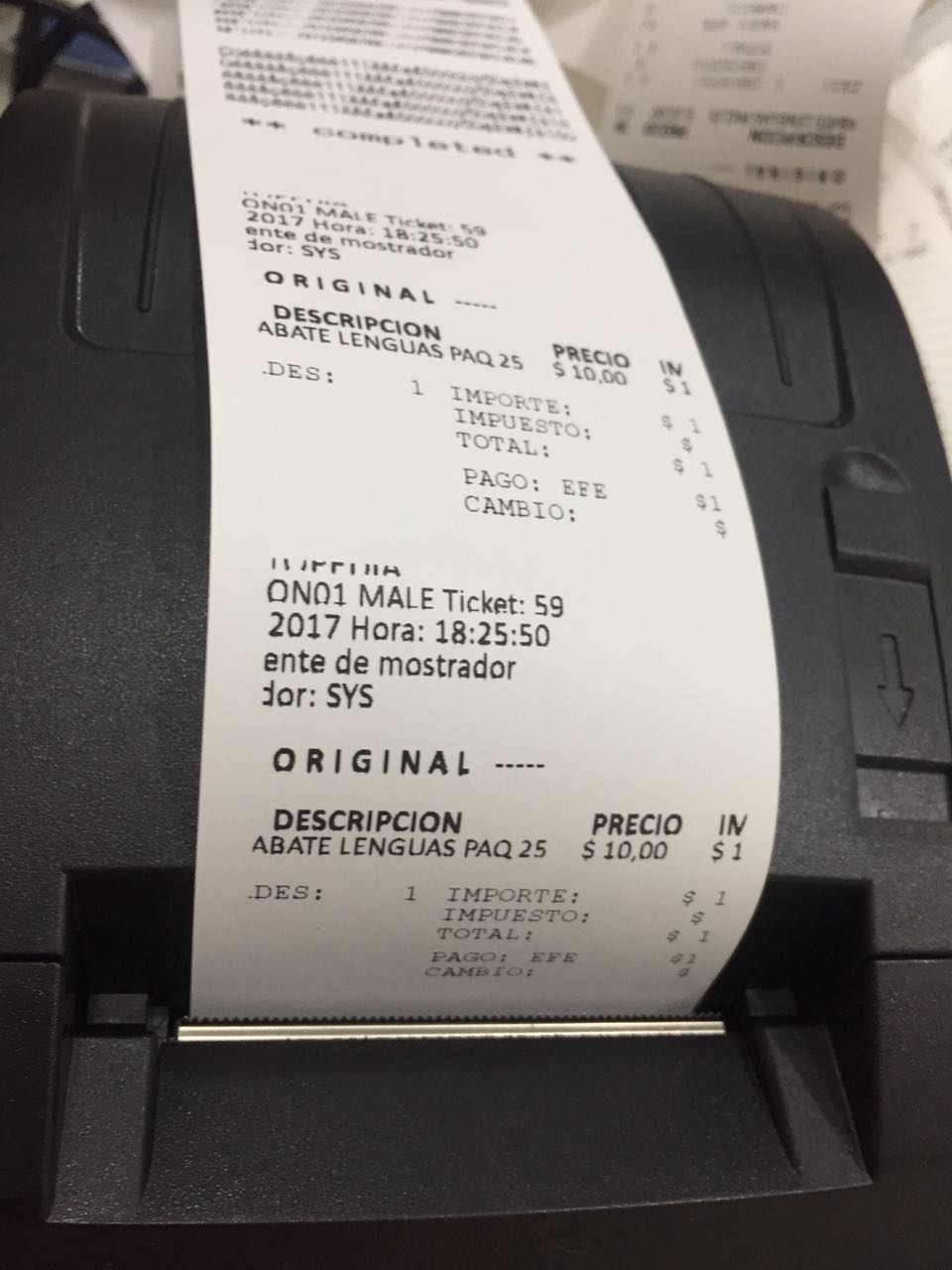
Descarga el formato de ticket de ejemplo para que conozcas el alcance de nuestro editor de ticket.


Whats 7222816462. Mejoramos la experiencia en el Punto de Venta de tu NEGOCIO
Descarga el formato de ticket de ejemplo para que conozcas el alcance de nuestro editor de ticket.
 UltraViewer está diseñado para brindar soporte a clientes, socios de forma remota. Para que sus clientes puedan observar todo lo que hacen en su pantalla y tomar el control cuando lo deseen.
Esta Query permite la reparación de los registros dañados de la base de datos MyBusiness POS 2012
La query le repara registros dañados por algún apagón,
sin embargo, NO ERRORES DE SINTAXIS en la programación.
Para utilizarla, es necesario tener instalado SQL Managemet Studio.
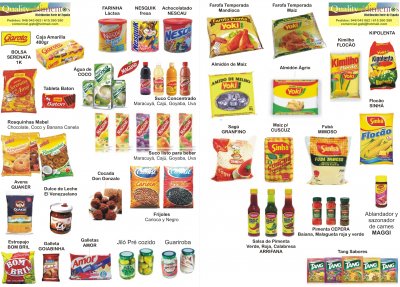
Descarga El archivo para dar de alta productos de internet, helpmybusinesspos.info
Este Vídeo muestra cómo implementar el catálogo de abarrotes, alta UltraRapida
‘jofelchez@gmail.com
‘whatsapp 7222816462
‘Alta de catálogo de producots desde halpmybusinesspos.info
Public imagen
Public info
Public codigoEncontrado
Sub Form_Load()
‘—-**** MyBusiness POS Generated
‘—-**** Date: 08-09-2008
‘—-**** Time: 22:35:42
‘—-**** User: SUP
Dim wf
Me.Caption = “ALTA ULTRARAPIDA”
cmdCancelar.Cancel = True
txtSKU.TabIndex = 0
txtDescripcion.TabIndex = 1
txtImpuesto.TabIndex = 2
txtPrecio.TabIndex = 3
cmdAceptar.TabIndex = 4
cmdCancelar.TabIndex = 5
codigoEncontrado = False
txtImpuesto = 0
txtSKU.Text = “” & GetSessionValue( Ambiente, “SKU_BUSCADO” )
‘Set wf = getWebFiles(“http://201.155.92.187:4420”, Ambiente.Path & “\web”)
‘c = wf.solicitaCodigo( txtSKU, “201.155.92.187”, 2000)
‘If Len( c ) > 3 Then
‘ If Mid(c,1,3) = “Ok.” Then
‘ codigoEncontrado = True
‘ Call procesaCadena( c )
‘ End If
‘End If
‘consulta
End Sub
Sub procesaCadena( c )
Dim n, s, i
c = Mid( c, 4 )
Do While True
n = clAt( “:–:”, c )
If n = 0 Then
Exit Do
Else
i = i + 1
If i = 1 Then
txtSKU = Mid( c, 1, n – 1 )
End If
If i = 2 Then
txtDescripcion = Mid( c, 1, n – 1 )
End If
If i = 3 Then
txtPrecio = Formato( Val2(Mid( c, 1, n – 1 )), “##,##0.00” )
txtPrecio.SelStart = 0
txtPrecio.SelLength = Len( txtPrecio )
End If
If i = 4 Then
imagen = Mid( c, 1, n – 1 )
End If
If i = 5 Then
info = Mid( c, 1, n – 1 )
End If
If i = 6 Then
txtImpuesto = Formato( Val2(Mid( c, 1, n – 1 )), “##,##0.00” )
End If
c = Mid( c, n + 4 )
End If
Loop
‘If Trim(info) <> “” Then
‘ WebBrowser.Navigate (info)
‘Else
‘ webBrowser1.Navigate “http://localhost:4410/aspnet/puntodeventa.aspx”
‘End If
End Sub
Sub Button_click()
‘—-**** MyBusiness POS Generated
‘—-**** Date: 09-09-2008
‘—-**** Time: 00:31:51
‘—-**** User: SUP
Select Case ControlEvento.Tag
Case “cmdAceptar”
Call salvaDatos()
Case “cmdCancelar”
DescargaForma
End Select
End Sub
Sub salvaDatos()
Dim Query, rstImpuesto, codigoImpuesto, wf,longitudDescipcion,informacion
dim rstProds
If clEmpty( txtSKU ) Then
MyMessage “Es necesario que indique el código de barras del producto”
txtSKU.Setfocus
Exit Sub
End If
If Val2( txtPrecio ) <= 0 Then
MyMessage “Es necesario que indique el precio del producto”
txtDescripcion.SetFocus
Exit Sub
End If
Set Query = NewQuery()
Set Query.Connection = Ambiente.Connection
Set rstImpuesto = CreaRecordSet( “SELECT * FROM impuestos WHERE valor = ” & Val2( txtImpuesto ), Ambiente.Connection )
If rstImpuesto.EOF Then
Query.strState = “INSERT”
Query.AddField “impuestos”,”Impuesto”, “I” & txtimpuesto
Query.AddField “impuestos”,”Descrip”, “I” & txtimpuesto
Query.AddField “impuestos”,”Valor”, txtimpuesto
Query.AddField “impuestos”,”Usuario”, Ambiente.Uid
Query.AddField “impuestos”,”usuFecha”, Date
Query.AddField “impuestos”,”usuHora”, Formato( Time, “hh:mm:ss” )
Query.Exec
codigoImpuesto = “I” & txtimpuesto
Else
codigoImpuesto = rstImpuesto(“impuesto”)
End If
Set rstProds = CreaRecordSet( “SELECT articulo FROM prods WHERE articulo = ‘” & txtSKU & “‘”, Ambiente.Connection )
longitudDescipcion = len(txtDescripcion)
informacion = Lcase(Mid( txtDescripcion, 1, longitudDescipcion – 7))
informacion = replace(informacion,”ñ”,”%C3%B1″) ‘ñ
informacion = replace(informacion,”á”,”a”) ‘a
informacion = replace(informacion,”é”,”e”) ‘e
informacion = replace(informacion,”í”,”i”) ‘i
informacion = replace(informacion,”ó”,”o”) ‘o
informacion = replace(informacion,”ú”,”u”) ‘u
Query.Reset
If rstProds.EOF Then
Query.strState = “INSERT”
Query.AddField “prods”, “linea”, “SYS”
Query.AddField “prods”, “marca”, “SYS”
Query.AddField “prods”, “ubicacion”, “SYS”
Query.AddField “prods”, “fabricante”, “SYS”
Query.AddField “prods”, “imagen”, info
‘Query.AddField “prods”, “url”, “https://mbasic.facebook.com/search/photos/?source=filter&isTrending=0&q=” & Mid( txtDescripcion, 1, longitudDescipcion – 7)
Else
Query.strState = “UPDATE”
Query.Condition = “articulo = ‘” & txtSKU & “‘”
End If
‘Query.strState = “INSERT”
Query.AddField “prods”, “articulo”, txtSKU
Query.AddField “prods”, “descrip”, txtDescripcion
Query.AddField “prods”, “precio1”, Val2(txtPrecio) / (1 + (Val2( txtImpuesto ) / 100))
Query.AddField “prods”, “impuesto”, codigoImpuesto
Query.AddField “prods”, “paraventa”, 1
Query.AddField “prods”, “invent”, 1
Query.AddField “prods”, “url”, “https://mbasic.facebook.com/search/photos/?source=filter&isTrending=0&q=” & informacion
Query.Exec
‘If Not clEmpty( txtDescripcion ) Then
Set rstProds2 = CreaRecordSet( “SELECT top 1 ARTICULO, prods.DESCRIP, prods.LINEA, prods.MARCA, PRECIO1, UNIDAD, IMPUESTO, INVENT, lineas.descrip as descripLinea, marcas.descrip as descripMarca FROM prods left join lineas on prods.linea = lineas.linea left join marcas on prods.marca= marcas.marca WHERE prods.autor is null or prods.autor <> ‘1’ order by articulo desc “, Ambiente.Connection )
If not rstProds2.EOF Then
consulta “INSERT IGNORE INTO prods (ARTICULO, DESCRIP, LINEA, MARCA, PRECIO1, UNIDAD, IMPUESTO, INVENT, DESCRIPLINEA, DESCRIPMARCA, USUFECHA ) VALUES (‘” & rstProds2(“ARTICULO”) & “‘, ‘” & rstProds2(“DESCRIP”) & “‘ , ‘” & rstProds2(“LINEA”) & “‘ , ‘” & rstProds2(“MARCA”) & “‘ , ‘” & rstProds2(“PRECIO1”) & “‘ , ‘” & rstProds2(“UNIDAD”) & “‘ , ‘” & rstProds2(“IMPUESTO”) & “‘ , ‘” & rstProds2(“INVENT”) & “‘ , ‘” & rstProds2(“DESCRIPLINEA”) & “‘ , ‘” & rstProds2(“DESCRIPMARCA”) & “‘ , now() ) ”
Ambiente.Connection.Execute “update prods set autor = 1 where articulo = ‘” & rstProds2(“ARTICULO”) & “‘ ”
end if
on error resume next
ParentObject.txtFields(3) = “”
ParentObject.LlenaPartida txtSKU.Text
DescargaForma
End Sub
Sub Form_Activate()
‘—-**** MyBusiness POS Generated
‘—-**** Date: 09-09-2008
‘—-**** Time: 02:15:05
‘—-**** User: SUP
On Error Resume Next
If clEmpty( txtDescripcion ) Then
txtDescripcion.SetFocus()
Else
If Not clEmpty( txtImpuesto ) Then
txtPrecio.SetFocus
Else
txtImpuesto.SetFocus
End If
End If
End Sub
Sub consulta(MiArticulo)
‘20180523 jose felix jofelchez@gmail.com
‘Consulta local al SOAP MyBUsinessPOS
Dim NS, NS_SOAP, NS_SOAPENC, NS_XSI, NS_XSD
‘NS = “http://ws.dgie.banxico.org.mx”
‘NS = “http://mybusinessposdesarrollos.com/”
‘NS = “http://helpmybusinesspos.info/”
NS = “urn:miserviciowsdl”
‘”https://www.w3schools.com/xml/”
NS_SOAP = “http://schemas.xmlsoap.org/soap/envelope/”
NS_SOAPENC = “http://schemas.xmlsoap.org/soap/encoding”
NS_XSI = “http://www.w3.org/2001/XMLSchema-instance”
NS_XSD = “http://www.w3.org/2001/XMLSchema” ‘”http://www.w3.org/2001/XMLSchema”
‘ The URL of the Web service.
Dim URL
‘URL = “http://localhost:4430/ws/hmbp.asmx?wsdl”
URL = “http://demo.helpmybusinesspos.info/ws/servicio_2.php?wsdl”
‘ The URL of the operation (function).
Dim Operation_HMBP
‘Operation_HMBP = “urn:MyServicewsdl#GetData”
Operation_HMBP = “urn:MyServicewsdl#GetData2”
‘ XML DOM objects.
Dim DOM, Envelope, Body, Operation, Param
‘ Creates an XML DOM object.
Set DOM = CreateObject(“MSXML2.DOMDocument.6.0”)
‘ Creates the main elements.
Set Envelope = DOM.createNode(1, “SOAP-ENV:Envelope”, NS_SOAP)
Envelope.setAttribute “xmlns:soapenc”, NS_SOAPENC
Envelope.setAttribute “xmlns:xsi”, NS_XSI
Envelope.setAttribute “xmlns:xsd”, NS_XSD
DOM.appendChild Envelope
Set Body = DOM.createElement(“SOAP-ENV:Body”)
Envelope.appendChild Body
‘ Creates an element for the TIPOSDECAMBIO function.
‘Set Operation = DOM.createNode(1, “ns1:GetData”, NS)
Set Operation = DOM.createNode(1, “ns1:GetData2”, NS)
Body.appendChild Operation
‘ Creates an element for the Celsius parameter (passes a value of 33 °C).
‘Parámetro 1
‘Set Param = DOM.createNode(1, “servidor”, NS)
Set Param = DOM.createNode(1, “ID”, NS)
‘Param.Text = MiServidor
Param.Text = MiArticulo
Operation.appendChild Param
‘Parámetro 2
‘Set Param2 = DOM.createNode(1, “baseDeDatos”, NS)
‘Param2.Text = MibaseDeDatos
‘Operation.appendChild Param2
‘Parámetro 3
‘Set Param3 = DOM.createNode(1, “cliente”, NS)
‘Param3.Text = MiCliente
‘Operation.appendChild Param3
‘ Releases the objects.
Set Param = Nothing
Set Operation = Nothing
Set Body = Nothing
Set Envelope = Nothing
‘xml que se enviará al servidor
‘mymessage “” & replace(DOM.xml ,”><“,”>” &vbCrLf& “<“) ‘ Creates an XML HTTP object for sending a request. Dim XMLHTTP Set XMLHTTP = CreateObject(“MSXML2.ServerXMLHTTP.6.0”) XMLHTTP.Open “POST”, URL, False XMLHTTP.setRequestHeader “Content-Type”, “text/xml; charset=utf-8” XMLHTTP.setRequestHeader “SOAPAction”, Operation_HMBP on error resume next ‘ Sends the request. XMLHTTP.send DOM.xml ‘ Loads the response to the DOM object. DOM.LoadXML XMLHTTP.responseXML.xml ‘ Releases the object. Set XMLHTTP = Nothing ‘ XML DOM objects. Dim NodeList, Element ‘xml que se regresa del servidor ‘mymessage “” & replace(DOM.xml ,”><“,”>” &vbCrLf& “<“)
‘ Searches for the CelsiusToFahrenheitResult object, which contains the value in degrees Fahrenheit.
Set NodeList = DOM.getElementsByTagName(“*”)
For Each Element in NodeList
If Element.tagName = “return” then
‘mymessage ” ” & Element.Text
‘procesaRespuesta Element.Text
‘cortar hasta el primer pipe
nPos = clAt( “|”, “” & Element.Text )
cArticulo = Mid( Element.Text, 1, nPos – 1)
txtSku = trim(cArticulo)
cDescripcion = Mid( Element.Text, nPos + 1)
‘cortar hasta el segundo pipe
nPos = clAt( “|”, “” & cDescripcion )
‘nPos2 = clAt( “|”, “” & cDescripcion )
cDescripcion = Mid( cDescripcion,1, nPos – 1)
txtDescripcion = trim(cDescripcion)
Exit For
End If
Next
‘ Releases the objects.
Set Element = Nothing
Set NodeList = Nothing
Set DOM = Nothing
End Sub
Sub procesaRespuesta( sMensaje)
Dim Query, rstArticulo
Dim NodeList, Element
mymessage “” & sMensaje
Set Query = NewQuery()
Set Query.Connection = Ambiente.Connection
Set xml = CreateObject(“Msxml2.DOMDocument.3.0”)
xml.loadXML((sMensaje))
Set NodeList = xml.getElementsByTagName(“*”)
For Each Element in NodeList
If Element.tagName = “bm:Obs” then
msgbox “Tipo de cambio : ” & Trim(Element.getAttribute(“OBS_VALUE”) ) & vbCrLf & “Fecha : ” & Trim(Element.getAttribute(“TIME_PERIOD”) )
Exit For
End If
Next
End Sub
Sub Text_LostFocus()
If ControlEvento.Tag = “txtSku” Then
‘consulta
consulta “SELECT articulo, descrip, precio1,linea,marca, impuesto FROM prods WHERE articulo = ‘” & trim(txtSKU) & “‘ or articulo like ‘%” & Cambia(“%”, ” “, txtSKU) & “%’ or descrip like ‘%” & Cambia(“%”, ” “, txtSKU) & “%’ order by articulo ”
Form_Activate
End If
End Sub
 Herramienta para enviar correo desde mybusiness POS
con la librería DLL vbSendMail
Aparecerá un mensaje qeu muestra el registro correcto de la librería Registrar_vbSendMail
importar el procedimiento Email_EjemploWebFiles2.paq
 Whats 7222816462